
From the archive. We first published this on Christmas Day 2012. The logos have changed since, but fake Apple emails like this one are still common, and the advice below still holds.
A new phishing email is going around, aimed at Mac and iPhone users. It is not real. Do not give it any of your information.
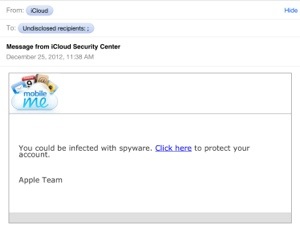
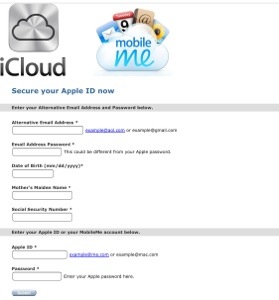
This is typical of the attacks aimed at Apple users more and more often. As we described in an earlier post, these are social engineering attacks. They cannot get past the security built into your Mac or iPhone, so instead they copy the look of a real email or website, often using the company's own logos, to trick you into handing over personal information, passwords or financial details.
How to avoid being taken in
- Do not click the link. Go to the real site yourself by typing its address into your browser (in this case, apple.com). If there really is a problem with your account, you will see it after you sign in.
- Check the address bar. If you are ever unsure about a website, look at the address at the top of the browser window. If it is not exactly the site you meant to visit, close the window and type the address yourself.
- Notice what is being asked for. No real company needs your email password, your mother's maiden name and your Social Security number to "secure" an account.
If you are running a current version of the operating system, Apple's built-in protection will likely start blocking the site in this email soon.
Think you may have already filled out a form like this? Change the passwords involved right away, and give us a call if you would like help.